by Jelle Roorda
5 (4 reviews)
Social Divi
This plugin adds the ability to add more social icons to your website when using the Divi theme.
Compatible with WP 6.8.3
v1.8.0
Current Version v1.8.0
Updated 6 months ago
Last Update on 26 May, 2025
Synced 16 hours ago
Last Synced on
Rank
#5,486
—
No change
Active Installs
1K+
—
No change
KW Avg Position
N/A
—
No change
Downloads
20.4K
—
Total downloads
Support Resolved
0%
—
No change
Rating
100%
Review 5 out of 5
5
(4 reviews)
Next Milestone 2K
1K+
2K+
136
Ranks to Climb
-
Growth Needed
1,932
Current Installs
Need 68 more installs to reach 2K+
Rank Changes
Current
#5,486
Change
Best
#
Active Installs Growth
Current
1,932+
Growth
Peak
1,932
Downloads Growth
Downloads
Growth
Peak
Reviews & Ratings
5.0
4 reviews
Overall
100%
5
4
(100%)
4
0
(0%)
3
0
(0%)
2
0
(0%)
1
0
(0%)
Tracked Keywords
Showing 0 of 0| Keyword | Position | Change | Type | Updated |
|---|---|---|---|---|
| No keyword data available yet. | ||||
Unlock Keyword Analytics
Track keyword rankings, search positions, and discover new ranking opportunities with a Pro subscription.
- Full keyword position tracking
- Historical ranking data
- Competitor keyword analysis
Track This Plugin
Get detailed analytics, keyword tracking, and position alerts delivered to your inbox.
Start Tracking FreePlugin Details
- Version
- 1.8.0
- Last Updated
- May 26, 2025
- Requires WP
- 5.1+
- Tested Up To
- 6.8.3
- PHP Version
- 5.4 or higher
- Author
- Jelle Roorda
Support & Rating
- Rating
- ★ ★ ★ ★ ★ 5
- Reviews
- 4
- Support Threads
- 0
- Resolved
- 0%
Keywords
Upgrade to Pro
Unlock keyword rankings, search positions, and detailed analytics with a Pro subscription.
Upgrade NowSimilar Plugins

Skyboot Custom Icons for Elementor
200K+ installs
#256

Performance Lab
200K+ installs
#266

Photo Gallery by 10Web - Mobile-Friendly Image Gallery
200K+ installs
#267

Instant Images – One-click Image Uploads from Unsplash, Openverse, Pixabay, Pexels, and Giphy
200K+ installs
#280

Dear Flipbook – PDF Flipbook, 3D Flipbook, PDF embed, PDF viewer
100K+ installs
#288
Frequently Asked Questions
Common questions about Social Divi
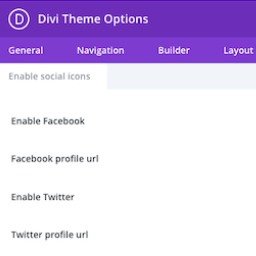
Click on 'Theme Options' in the 'Divi' menu in the admin interface. Click on the new 'Social Icons' tab. Enable the switch for the icons you want to use. Fill out the URL to your profile account on the social media platform.
The icons appear wherever Divi would normally place your social media icons. By default this is in the footer, and in the secondary menu bar.