by Keylor Mendoza
4.7 (25 reviews)
WC Pickup Store
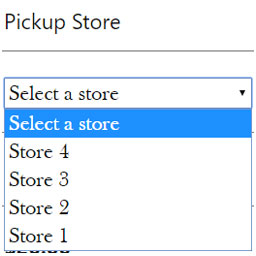
WC Pickup Store is a custom shipping method that lets you to set up one or multiple stores to local pickup in the Checkout page in WooCommerce
Compatible with WP 6.8.3
v1.8.10
Current Version v1.8.10
Updated 5 months ago
Last Update on 12 Jul, 2025
Synced 14 hours ago
Last Synced on
Rank
#4,739
—
No change
Active Installs
2K+
—
No change
KW Avg Position
28.5
—
No change
Downloads
62.5K
—
Total downloads
Support Resolved
50%
—
No change
Rating
94%
Review 4.7 out of 5
4.7
(25 reviews)
Next Milestone 3K
2K+
3K+
301
Ranks to Climb
-
Growth Needed
2,693
Current Installs
Need 307 more installs to reach 3K+
Rank Changes
Current
#4,739
Change
Best
#
Active Installs Growth
Current
2,693+
Growth
Peak
2,693
Downloads Growth
Downloads
Growth
Peak
Reviews & Ratings
4.7
25 reviews
Overall
94%
5
21
(84%)
4
2
(8%)
3
0
(0%)
2
2
(8%)
1
0
(0%)
Tracked Keywords
Showing 2 of 2| Keyword | Position | Change | Type | Updated |
|---|---|---|---|---|
| local pickup | 26 | — | Tag | 19 hours ago |
| store pickup | 31 | — | Tag | 19 hours ago |
Unlock Keyword Analytics
Track keyword rankings, search positions, and discover new ranking opportunities with a Pro subscription.
- Full keyword position tracking
- Historical ranking data
- Competitor keyword analysis
Support Threads Overview
Resolved
Unresolved
2
Total Threads
1
Resolved
1
Unresolved
50%
Resolution Rate
Track This Plugin
Get detailed analytics, keyword tracking, and position alerts delivered to your inbox.
Start Tracking FreePlugin Details
- Version
- 1.8.10
- Last Updated
- Jul 12, 2025
- Requires WP
- 4.7+
- Tested Up To
- 6.8.3
- PHP Version
- N/A
- Author
- Keylor Mendoza
Support & Rating
- Rating
- ★ ★ ★ ★ ★ 4.7
- Reviews
- 25
- Support Threads
- 2
- Resolved
- 50%
Keywords
Upgrade to Pro
Unlock keyword rankings, search positions, and detailed analytics with a Pro subscription.
Upgrade NowSimilar Plugins





Frequently Asked Questions
Common questions about WC Pickup Store
Just activate the plugin, go to settings page and enable the shipping method. Customize the shipping method title, default store and checkout notification message.
Go to Menu > Stores > All Stores > Add New
Yes, you can override all the templates. Just copy from /plugins/wc-pickup-store/templates/ to /theme/template-parts/. Single store and archive page might be overriden in /theme/ directory as WordPress does.
Simply use filters wps_store_get_waze_icon or wps_store_get_vc_waze_icon to manage waze icon
Yes, just go to Menu > Appearance > Customize > WC Pickup Store > Default Store. Also you can use the filter wps_first_store to do that
The shortcode functionality had been removed since previous versions but since version 1.5.13 you can use the archive-store.php located in the plugin templates directory
Fortunately since version 1.5.13 the option to set custom costs by shipping method or per stores is available. Hope you enjoy it! Update 1.5.21 let you calculate shipping costs by flat rate or percentage
Sure, now you can add an email address into the store admin page and it will be notified on order sent to this store.
You can use the filter wps_settings_data with the key title to create a custom valid translation for the title. Available since version 1.5.22
First, this functionality will work if your Shop is enabled to sell to specific countries, if not, you must to update all the stores to the default Shop country using the link on the notice about this feature (available since version 1.5.24). Then, you just have to choose a country for each store on the store settings page.